Rooms and exits
To fully understand what is happening when you build, you need to know about rooms and exits.
Rooms
Rooms are where players go and meet. Rooms hold:
- Players
- Things
- Exits
Exits
Exits link rooms to each other. Contrary to what you might think, each exit has its own "database number. The diagram below should make this clearer. If you have two rooms, "Cave" and "Waterfall", and you can go east/west to get between them, then you actually have four database objects, as follows:
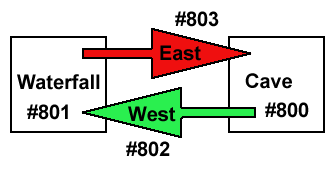
- Room #800 (Cave) contains an exit #802 (West) linked to #801
- Room #801 (Waterfall) contains an exit #803 (East) linked to #800
You do not necessarily have to have exits in both directions. A room might have no exits, and thus only be accesible by "teleporting". A room with an exit leading one way but not the other might represent a "one-way" sort of link, such as a drop from a trap-door into a room below.
Locks
Exits can have "locks" put on them. A lock stops unconditional passage from one room to another. For example, you might set a lock so that:
- Only certain people can use an exit
- You have to be a certain sex to use an exit
- You have to be carrying a special object (eg. a key) to use an exit
Locks are explained in more detail later on. Click on Locks Introduction for more detail about locks.
Attributes
Rooms and exits can have attributes put on them. These control messages and actions that are displayed or invoked when someone passes or fails the various locks. These are used to add colour to the game. For example, if someone cannot use the East exit (because they are not carrying an important object) they might see an explanatory message ...
You must be carrying the Wand of Gandor to go east!
Click on Lock Messages for more details about messages that are triggered by attempting to use locked rooms or exits.