Notice: Any messages purporting to come from this site telling you that your password has expired, or that you need to verify your details, confirm your email, resolve issues, making threats, or asking for money, are
spam. We do not email users with any such messages. If you have lost your password you can obtain a new one by using the
password reset link.
Due to spam on this forum, all posts now need moderator approval.
Entire forum
➜ Electronics
➜ Microprocessors
➜ Why electronics?
Postings by administrators only.
Refresh page
| Posted by
| Nick Gammon
Australia (23,173 posts) Bio
Forum Administrator |
| Date
| Tue 25 Jan 2011 03:55 AM (UTC) Amended on Tue 25 Jan 2011 03:56 AM (UTC) by Nick Gammon
|
| Message
| In case any of the regular visitors to this forum are wondering "what has electronics got to do with MUD games?" - then this is my response ...
Apart from the obvious fact that PCs (and Macs etc.) are basically sophisticated electronic gadgets, I have been experimenting recently with making an RPG game "on a chip" (or a least, a few chips). This is the prototype:

The basic idea is that the entire game is on an ATmega328P microprocessor (visible above but not very clearly, in the top left corner).
This particular chip has 32 Kb of "firmware" (with 512 bytes used for the bootloader). It also has 2 Kb of SRAM and 1 Kb of EEPROM. The firmware RAM is unchanged even when powered off, so you can always just turn it on and play. The SRAM is your volatile RAM for calculations (eg. combat calculations) and the EEPROM can be changed by the program to save stuff between power-off sessions. For example, the EEPROM is used to remember which room you were in.
As you can see from the photo, there is a 4x20 character LCD display to show where you are, with 3 buttons underneath (like a mobile phone) which will have different functionality depending on the circumstances. There is also a "directional keypad" on the right which lets you go north, south etc.
In these modern times when computers are becoming more and more complex (what with DLLs, operating systems which require a gigabyte of memory, viruses, etc.) it is a bit of a refreshing change to make a game that fits entirely into 32 Kb of memory.
Programming is in C++, and changes can be quickly downloaded via the USB cable you see in the photo. Once downloaded the whole thing can be powered from a 9v battery. |
- Nick Gammon
www.gammon.com.au, www.mushclient.com | | Top |
|
| Posted by
| Twisol
USA (2,257 posts) Bio
|
| Date
| Reply #1 on Tue 25 Jan 2011 03:58 AM (UTC) |
| Message
| | That's really cool! I've always wanted to try doing low-level/hardware stuff. Is the Arduino a good place to start? |
'Soludra' on Achaea
Blog: http://jonathan.com/
GitHub: http://github.com/Twisol | | Top |
|
| Posted by
| Nick Gammon
Australia (23,173 posts) Bio
Forum Administrator |
| Date
| Reply #2 on Tue 25 Jan 2011 04:37 AM (UTC) Amended on Tue 25 Jan 2011 04:51 AM (UTC) by Nick Gammon
|
| Message
| Well I've certainly been happy with it. I've also tried other microprocessors, and without wanting to sledge anyone, I have to say that the Arduino wins my personal award for being extremely well documented, works "out of the box" and easy to get started with.
I've been ordering mine from:
http://www.adafruit.com/
In particular you might want to look for the "Starter Pack for Arduino" - $US 65.
The Arduino itself is only $US 30, assembled, and is pretty good value IMHO.
It can be programmed "in circuit" using a standard USB cable. The programming environment (free download) works on Mac, Windows and Linux. Programming is in a gcc-variant, and seems to work pretty smoothly.
The Starter Pack gives you some extra goodies which you might appreciate if you are just starting to play, like a battery pack, USB cable, protoshield kit, breadboard, 9v wallplug, and some preliminary components like LEDs, variable resistors, resistors, switches, and a light sensor.
One of the things I like about the Arduino is their "shield" idea, which basically means you can plug another circuit board on top of the processor because the main board brings out most pins on a sort-of header-thing. You can then just plug another gadget on top. For example, Ethernet board, LED board, prototyping board.
Just to show the idea, here is my Lots Of LEDs shield, running the Game Of Life:

Side-on, you can see better that the LEDs are on top of the processor:

And then a quick yank, and they are separated. You can see how the pins mate together to quickly connect them together:

(The red tape is because the bottom of the LEDs are pretty damn close to the USB connector, and I was worrying about them shorting out).
It's this flexibility which is very appealing - there are lots of shields and other stuff on the web site, and you soon start thinking about how you might measure temperatures, check switches, light levels etc., and then do things with that information.
For example, with the Ethernet shield, you can connect to a local web server and upload the data. Or you can use the raw Arduino to do RS232 comms (via the USB cable). |
- Nick Gammon
www.gammon.com.au, www.mushclient.com | | Top |
|
| Posted by
| Nick Gammon
Australia (23,173 posts) Bio
Forum Administrator |
| Date
| Reply #3 on Tue 25 Jan 2011 04:49 AM (UTC) |
| Message
| By the way, check out the size of the processor on the new SMD (surface mounted device) edition:
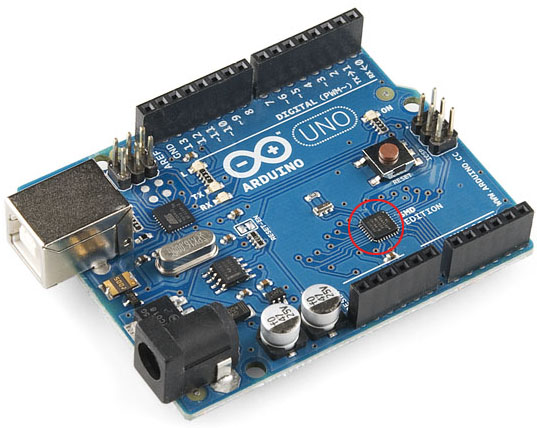
I have ordered a couple of these but they haven't arrived yet. Compare the processor size (circled in red) to the photos further up the page. By comparison, you can see the size of the USB outlet on the left, and the 9v power socket.
When you consider that that tiny little processor has 32 Kb of RAM, plus the other stuff I mentioned above, including support for serial, SPI (and other) communication, and runs at 16 MHz, it is pretty amazing. I mean, by way of comparison, the early IBM PCs ran at 4.77 MHz. |
- Nick Gammon
www.gammon.com.au, www.mushclient.com | | Top |
|
| Posted by
| Twisol
USA (2,257 posts) Bio
|
| Date
| Reply #4 on Tue 25 Jan 2011 07:52 AM (UTC) Amended on Tue 25 Jan 2011 07:56 AM (UTC) by Twisol
|
| Message
| Hmm, you edited your post and replaced it with something else - I was responding to the Arduino stuff now in the other post.
My comments still stand though: that's really cool :D I think I need to get myself an Arduino kit.
([EDIT]: Oh - I think you moved my post, now it makes sense.) |
'Soludra' on Achaea
Blog: http://jonathan.com/
GitHub: http://github.com/Twisol | | Top |
|
| Posted by
| Nick Gammon
Australia (23,173 posts) Bio
Forum Administrator |
| Date
| Reply #5 on Sat 29 Jan 2011 06:55 AM (UTC) |
| Message
| My SMD (surface mounted device) Arduino arrived a couple of days ago. It is pretty amazing to think that all that processing power is on a chip not much larger than a match head:

Zooming in:

Remember, this chip can hold a 32 Kb program, with 2 Kb of RAM, and 1 Kb of EEPROM for saving data from one session to the next. |
- Nick Gammon
www.gammon.com.au, www.mushclient.com | | Top |
|
The dates and times for posts above are shown in Universal Co-ordinated Time (UTC).
To show them in your local time you can join the forum, and then set the 'time correction' field in your profile to the number of hours difference between your location and UTC time.
25,898 views.
Postings by administrators only.
Refresh page
![[Go to top]](/images/gototop.gif) top
top