Version 3.70 of MUSHclient has new Lua script functions: utils.choose and utils.listbox
These behave very similarly so they will be described together.
These functions display a dialog box with a predetermined list of items for the user to choose from. If the user cancels the dialog box, or does not make a selection, nil is returned. Otherwise the key of the selected item is returned.
- utils.choose - displays a dialog box with a combo-box in it (drop-down list)
- utils.listbox - displays a dialog box with a list control in it
The utils.listbox would be more suitable for longer lists, but that is probably partly personal preference.
The calling sequence is:
result = utils.choose ( msg, title, t, default )
The only required arguments are the message text and the table of choices (t).
- msg = message to display (max 1000 characters)
- title = title of box - if nil, defaults to "MUSHclient" (max 100 characters)
- t - table of key/value pairs, as described below
- default = default key - defaults to no selection
Return value = the key of what they selected, or nil if cancelled, or nothing selected.
The third argument is a table of key/value pairs. The value is displayed, however the corresponding key is returned. The values are automatically sorted into ascending alphabetic order.
The fourth argument is the key (string or number) which corresponds to the wanted default selection. If it does not correspond to any key in the table then no item will be selected.
Example:
print (utils.choose ("Your favourite", "Foods ...", { "apples", "bananas", "peaches", "cream" } ))
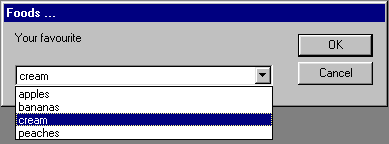
Possible returned values would be:
- nil - if no choice made or dialog cancelled
- 1 - apples chosen
- 2 - bananas chosen
- 3 - peaches chosen
- 4 - cream chosen
(Note that peaches is actually shown 4th in the list as the list is sorted).
To convert from the key back to the value, simply index into your table. Eg.
t = { "apples", "bananas", "peaches", "cream" }
result = utils.listbox ("Your favourite", "Foods ...", t)

if result then
  print ("You chose", t [result])
else
  print "Nothing chosen"
end -- if
Keys and values can be either strings or numbers. MUSHclient will distinguish between strings and numbers which are the same (eg. "10" and 10 are considered different keys).
Here is an example of using string keys, and supplying a default choice:
t = {
    fruit = "apple",
    vegetable = "potato",
    spice = "pepper",
    herb = "parsley",
    }
result = utils.listbox ("Choose a food", "Foods ...", t, "fruit")

if result then
  print ("You chose key", result, "which is", t [result])
else
  print "Nothing chosen"
end -- if
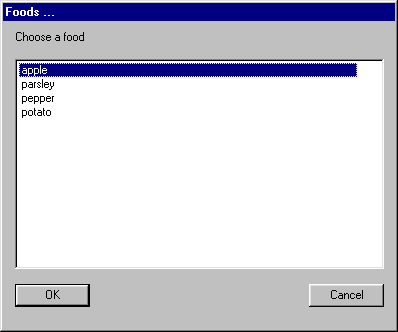
Possible returned values would be:
- nil - if no choice made or dialog cancelled
- "fruit" - apple chosen
- "vegetable" - potato chosen
- "spice" - pepper chosen
- "herb" - parsley chosen
The return value will be one of the following types:
- nil - if no selection made or dialog cancelled
- string - if an item with a string key is selected
- number - if an item with a numeric key is selected