Below is a preliminary attempt at a mapper for Materia Magica. The tricky bit, as usual, with MUDs is trying to detect when you are in a new room, and work out a room number.
In this case I looked for a yellow line (the room name) followed by a blue line with hyphens in it (the compass) followed by some gray lines (the description). Put all that together and you should have something reasonably reliable.
The exit detection is simply done by noticing you are in another room, and working out which way you came from the previous room.
When you first go to a new room it will appear disconnected, until you walk back the way you came. Then it realises that if east from A is B, and west from B is A, then A and B are connected.
The mapper plugin has been improved today to detect exits from the Visible Exits line which you can turn on (see above post). I have removed the plugin from the post and moved it to GitHub. That way you can always get the latest one.
The "history" link shows what has changed recently, when and why. Well, hopefully.
Because of the exit detection you will now see "stub" lines which show rooms that it knows exist (because there is an exit leading there) but it doesn't yet know what room is there.
I know it sounds terrible, but I got a chubby as soon as I read this. My MUSHClient dreams have come true, ty Nick!
The only other question, and I don't know if I asked this in another thread last night, is how will it handle dizzy rooms, looping rooms, teleporting rooms, etc?
Basically it draws "normal" exits - teleports and funny rooms might make it either not draw them, or draw inconsistently. I haven't really addressed that sort of thing.
One major change is to use a SQLite database, rather than saving the map in the plugin state file.
What this does is let you share the maps much more readily - for example, if you have multiple characters they will all use the same database, so you don't have to remap every time you switch characters. Also you could conceivably dump the database into a text file (see "Backing up your database" on http://www.gammon.com.au/db) and then email that to someone else to incorporate into theirs (effectively, merging your database with theirs).
Some other improvements:
Shops are marked in darker brown (see example above) so you can more easily find them
Trainers are marked in yellow
You can RH-click to add bookmarks (eg. "quest")
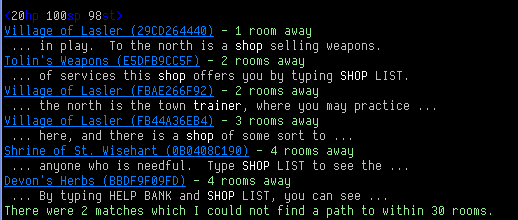
You can search for shops, trainers or for any word in the room name or room description, eg:
mapper shops

Devon's Herbs (BBDF9F09FD) - 8 rooms away
Tolin's Weapons (E5DFB9CC5F) - 8 rooms away
Telgan's Tavern (3DACF5215A) - 9 rooms away
Shrine of St. Wisehart (0B0408C190) - 12 rooms away
Savonty's Barbershop (76E5347C13) - 13 rooms away
Galbo's Armor (D9ADD4A960) - 14 rooms away
The Hungry Goat Inn (7307E97D8E) - 15 rooms away
The Bank of Rune, Lasler Branch (CED07B0B8B) - 16 rooms away
General Store (43AA57A385) - 16 rooms away


mapper train


Hall of Training (79F3C09702) - 11 rooms away
Hall of Training (B7FD218B1D) - 12 rooms away
There were 2 matches which I could not find a path to within 30 rooms.


mapper find irvin


Bedroom (FA2A468D8C) - 1 room away
Living Room (068C303A14) - 2 rooms away
Cramped Closet is the room you are in
Master Irvin's Office (5C862533CB) - 3 rooms away
Shops and trainers are auto-detected as you walk around
It detects lines like "The door is closed." and then automatically opens the door.
You could do more, but this should give you something to play with.
The new version is available from GitHub, link given above.
I installed this updated plugin but I got a few errors. Upon initial loading:
Run-time error
Plugin: Materia_Magica_Mapper (called from world: Materia Magica - Forral)
Function/Sub: Other_Line called by trigger
Reason: processing trigger "Other_Line"
[string "Plugin"]:658: table rooms has no column named desc
stack traceback:
[C]: in function 'error'
[string "Plugin"]:593: in function 'dbcheck'
[string "Plugin"]:658: in function 'save_room_to_database'
[string "Plugin"]:179: in function <[string "Plugin"]:103>
Error context in script:
654 : function save_room_to_database (uid, title, desc)
655 :
656 : assert (uid, "No UID supplied to save_room_to_database")
657 :
658*: dbcheck (db:execute (string.format (
659 : "INSERT INTO rooms (uid, name, desc, date_added) VALUES (%s, %s, %s, DATETIME('NOW'));",
660 : fixsql (uid),
661 : fixsql (title),
662 : fixsql (desc)
You have entered "The Separatists Clan Hall".
Trigger function "Other_Line" not found or had a previous error.
[*][SAFE]<3087hp 2500sp 1692st> [ 0 * 0 * 22 ]
Trigger function "Other_Line" not found or had a previous error.
l
And that line "Trigger function "Other_Line" not found or had a previous error" repeats itself after every single line.
For a minute I thought I must have forgotten to create that column "desc" but it gets created with everything else. I don't really understand that. What version of MUSHclient are you using?
Can you please:
Remove the plugin (so the database isn't in use)
Delete the database (materiamagica.com_23.db) from your MUSHclient directory (the number 23 might be different depending on what port you connect on).
Re-install the plugin
Let me know of any other error messages (like, when first starting).
I can see one potential problem. Maybe "desc" is a reserved word, although it works for me.
[EDIT] The word "DESC" is indeed an SQL word (short for descending) so I am puzzled why it ever worked. I am guessing your version of the SQLite engine was earlier and does not allow "desc" in that way. If you had a version of MUSHclient which is 4.60 or earlier this might be the case.
I've updated the plugin to use "description" instead. Try grabbing the latest plugin (it should be version 1.2) and then follow my instructions above to delete the database and start again (it needs to make a new database with "description" rather than "desc").
Because of this change, anyone else who is using the plugin will need to delete the database and start again. Sorry.
As an alternative (if you have already mapped a lot of rooms - this won't be you Forral) you can do this:
Close MUSHclient so the database is not in use.
Grab the "command line tool" from the SQLite3 web site, eg.
http://www.sqlite.org/sqlite-3_7_3.zip
Unzip that and put sqlite3.exe into your MUSHclient directory.
Open a command window (Run -> Cmd), change directory to the MUSHclient directory, and type:
(The number 23 might be 4000 - it is whatever port you use to connect).
Use a text editor like Crimson Editor to open up the resulting file materiamagica.sql.
A few lines down change "desc" to "description":
CREATE TABLE rooms (
      roomid        INTEGER PRIMARY KEY AUTOINCREMENT,
      uid           TEXT NOT NULL,   -- vnum or how the MUD identifies the room
      name          TEXT,            -- name of room
      description   TEXT,            -- description
      building      TEXT,            -- which building it is in
      shop          INTEGER,         -- 1 = shop here
      train         INTEGER,         -- 1 = trainer here
      notes         TEXT,            -- player notes
      date_added    DATE,            -- date added to database
      UNIQUE (uid)
    );
Further down find these lines and change "desc" to "description" in two places:
Thanks for the fix Nick. Oddly though, its not mapping the rooms. I no longer get the error messages and I do see the message of each room being added to the database with a unique ID, but its not drawing it.
In response to your previous post I am still the latest MUSHClient, 4.64.
As I mentioned earlier, you need to backtrack a bit. That is, when visiting a new room you are likely to just see one square. But if you backtrack it should join them. So for example, in a town, walk all the way east (you will just see single squares). Then walk west, and they will start to be connected. It doesn't assume that going east from a room means you can go west to get back there.
I noticed that the SQLite database offers not only FTS (full text search) but "snippets". Now if you have used search engines you probably notice that when you search for a word that word in shown in the context it appears in the web page. This can be quite handy. For example, in the mapper if you were searching for "baker" you probably want the baker shop, not something like:
The baker used to live here.
North is the baker.
This is the tombstone of the baker.
So now if you do a "mapper find" it shows an extra line with your searched-for words in bold (using the search you can search for multiple things like "butcher OR baker").
For example:
In the above example I searched for:
mapper find shop OR trainer*
Note the use of OR (upper-case) which is required to search for this OR that (otherwise it looks for the word "or"). Also you can add an asterisk to match on trainer, trainers, etc.
Partial goto
A problem with the hashed room numbers is that they are tedious (impossible?) to type by hand. However you may want to quickly goto a common room (eg. the village square).
The goto has been amended to match on a partial room number, so instead of:
mapper goto e960d909fb
... you can now type:
mapper goto e96
The mapper will find the closest room starting with "e96" as its room number in this case. In many cases 3 or 4 digits are likely to be plenty.
RH-click on the "raw" link, download the file, and put it into the "lua" subdirectory under the MUSHclient directory, replacing the existing mapper.lua file.
You also need the updated mapper plugin, from this page:
I have been trying for about two hours to get this to work but I can't no matter what I do :(, I doesn't even show any rooms at all on the mapper. I am assuming you need SQLite in order for it to work and ive only tried to download it to plugin's. I have no idea how to install it using SQLite since I've never messed with SQLite. Any possible way you could post a tutorial on how to go about installing SQLite with a link then placing this file into SQLite in order to make it work? It would be greatly appreciated :)!
I too got an error message similar to the person a few posts earlier:
Scripting error
Error number: 0
Event: Run-time error
Raised by: Plugin: Materia_Magica_Mapper (called from world: Merentha)
Description: [string "Plugin"]:731: table rooms has no column named shop
stack traceback:
[C]: in function 'error'
[string "Plugin"]:619: in function 'dbcheck'
[string "Plugin"]:731: in function 'create_tables'
[string "Plugin"]:501: in function <[string "Plugin"]:471>
Called by: Function/Sub: OnPluginInstall called by Plugin Materia_Magica_Mapper
Reason: Executing plugin Materia_Magica_Mapper sub OnPluginInstall
~~~~~~~~~~~~~
Any comments or suggestions would be much appreciated. :)
Description: [string "Plugin"]:731: table rooms has no column named shop
stack traceback:
[C]: in function 'error'
[string "Plugin"]:619: in function 'dbcheck'
[string "Plugin"]:731: in function 'create_tables'
[string "Plugin"]:501: in function <[string "Plugin"]:471>
Called by: Function/Sub: OnPluginInstall called by Plugin Materia_Magica_Mapper
Reason: Executing plugin Materia_Magica_Mapper sub OnPluginInstall
~~~~~~~~~~~~~
Any comments or suggestions would be much appreciated. :)
Did you try another version of the mapper before? You may have a different (format) database. Try deleting the database file (close the world first so it isn't in use).
Its name will be something like "materiamagica.com_23.db" and it will be in the MUSHclient "executable" directory.
Description: [string "Plugin"]:731: table rooms has no column named shop
stack traceback:
[C]: in function 'error'
[string "Plugin"]:619: in function 'dbcheck'
[string "Plugin"]:731: in function 'create_tables'
[string "Plugin"]:501: in function <[string "Plugin"]:471>
Called by: Function/Sub: OnPluginInstall called by Plugin Materia_Magica_Mapper
Reason: Executing plugin Materia_Magica_Mapper sub OnPluginInstall
~~~~~~~~~~~~~
Any comments or suggestions would be much appreciated. :)
Did you try another version of the mapper before? You may have a different (format) database. Try deleting the database file (close the world first so it isn't in use).
Its name will be something like "materiamagica.com_23.db" and it will be in the MUSHclient "executable" directory.
Ah yes thank you for that! Deleting those .db files fixed the problem! Except when the mapper comes on, it still stays the same green window (i.e. with the text of info about it in the middle and that's it).
I get the following runtime error, and am wondering if there is a way to get this mapper to work with my MUD:
[string "Plugin"]:731: table rooms has no column named shop
stack traceback:
[C]: in function 'error'
[string "Plugin"]:619: in function 'dbcheck'
[string "Plugin"]:731: in function 'create_tables'
[string "Plugin"]:501: in function <[string "Plugin"]:471>
You haven't said what MUD it is, but I would close the client, delete the mapper database, and start it up again. It looks like you might have an older database. With none there, it re-makes it.
Pretty cool, but one major issue (besides dizzy rooms, teleport rooms, etc)
Rooms that have same description. I.e., "wilderness areas" or roads that have same descrips.. without reviewing the code, i'm assuming it disregards same descrips so that it is not fooled by room LOOK. Problem with mapper is that it does not detect movement from one room to an adjacent room with same descrip, so it has to continually remap at the "end of the street" etc. (a lot of "fixed exits" on paths that have already been mapped) The result is an erroneous map in which paths connected to either "end" are out of synch. A city block that should be rectangular is now a spiral path or something equally silly.
Yes, that's annoying. I've done a few versions over the years, one of them incorporated the room exits to try to make the rooms unique. Not that this would always work.