![[Home]](/images/home.gif)
![[Downloads]](/images/downloads.gif)
![[Search]](/images/search.gif)
![[Help/forum]](/images/forum.gif)

Updated 15th June 1997.
The main drawback with the simple example is that you have to amend the script every time you want to add a new location to teleport to.
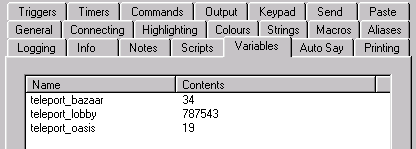
This example shows how to store teleport locations as a MUSHclient "variable", so that you can add new locations "on-the-fly". As the variables are stored in the world file they are saved when you save the world, and available next time you use that world.
sub OnTeleport (thename, theoutput, thewildcards)

dim sDestination
dim sRoomList
dim sHelp
dim iSubscript
dim iRoom

sDestination = Trim (thewildcards(1))

' if nothing entered echo possible destinations
if sDestination = "" then
  world.note "-------- TELEPORT destinations ----------"

  ' find list of all variables
  sRoomList = world.GetVariableList

  if not IsEmpty (sRoomList) then

      ' loop through each variable, and add to help if it starts with "teleport_"
      for iSubscript = lbound (sRoomList) to ubound (sRoomList)
         if Left (sRoomList (iSubscript), 9) = "teleport_" then
            if sHelp <> "" then
              sHelp = sHelp & ", "
            end if
            sHelp = sHelp & Mid (sRoomList (iSubscript), 10)
         end if   ' variable starts with "teleport_"
      next        ' loop through sRoomList

  end if

  ' if no destinations found, tell them
  if sHelp = "" then
    sHelp = "<no rooms in teleport list>"
  end if    ' no destinations found in list
  world.note sHelp
  exit sub

end if    ' no destination supplied

' get contents of the destination variable
iRoom = world.GetVariable ("teleport_" & lCase (sDestination))

' if not found, or invalid name, that isn't in the list
if IsEmpty (iRoom) or IsNull (iRoom) then
  world.note "******** Destination " & sDestination & " unknown *********"
  exit sub
end if

world.note "------> Teleporting to " & sDestination
world.send "@teleport #" & cstr (iRoom)

end sub
The resulting alias will look like this:
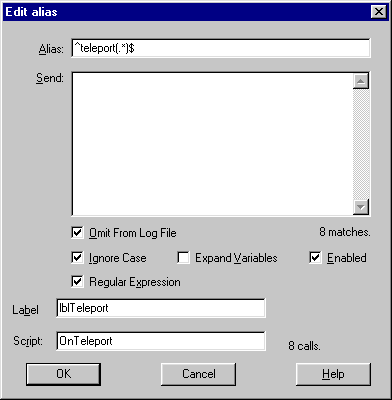
^teleport(.*)$
add_teleport RocketShip 3321The subroutine uses two wildcards to allow you to type in two words separated by a space. It does a couple of checks (eg. that the second word is a number) and then calls "world.setvariable" to add it to the variables list. The subroutine looks like this:
sub OnAddTeleport (thename, theoutput, thewildcards)

dim sDestination
dim iRoom
dim iStatus
dim sCurrentLocation

' wildcard one is the destination
sDestination = Trim (thewildcards (1))

' if nothing entered tell them command syntax
if sDestination = "" then
  world.note "Syntax: add_teleport name dbref"
  world.note "    eg. add_teleport LandingBay 4421"
  exit sub
end if

' wildcard 2 is the room to go to
iRoom= Trim (thewildcards (2))

if not IsNumeric (iRoom) then
  world.note "Room to teleport to must be a number, you entered: " & iRoom
  exit sub
end if

' add room and destination location to variable list
iStatus = world.SetVariable ("teleport_" & sDestination, iRoom)

if iStatus <> 0 then
  world.note "Room name must be alphabetic, you entered: " & sDestination
  exit sub
end if

world.note "Teleport location " & sDestination & "(#" _
           & iRoom & ") added to teleport list"

end sub
You will now need to add an alias which matches on "add_teleport" with a script subroutine of "OnAddTeleport", using a very similar method to the one for adding the "teleport" alias.
In this case, however, you need to match on:
add_teleport * *The first wildcard is the room name, the second wildcard is the room number.
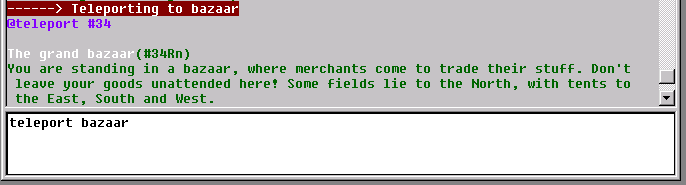
First type in:
add_teleport bazaar 34
And then type in:
teleport bazaar
Here is what it looked like for me...
If you get syntax errors, just edit the script file and correct them. If you are using Window NT, MUSHclient will automatically detect that you have changed the script file and offer to reprocess it. If you are using Windows 95, just use the "reload script file" function (Shift+Ctrl+R).
![[Previous]](/images/previous.gif)
![[Back]](/images/back.gif)

Comments to Gammon Software support
![[Best viewed with any browser - 2K]](/images/anybrowser2.gif)

![[Hosted at HostDash]](/images/hostdash_logo.png "Hosted at HostDash")