MUD Client Timing Benchmarks and Features
Clients are listed in order of fastest to slowest.
Test conducted on 22nd July 2000.
| Client timing benchmarks and features | |||||||
|---|---|---|---|---|---|---|---|
| Client | Version | Download size | Executable size | Time (secs) | Lines kept | Features | |
| MUSHclient | 3.00 | 1.32 Mb | 1.19 Mb | 1.4 | 500,000 | aAcCfFGikKLMnpPsStTuUwZz | |
| MUTT | 0.1k | 81 Kb | 32 Kb | 4 | 200 | FGLMsTwuU | |
| MUDmaster 2000 | 3.0.8.0 | 609 Kb | 676 Kb | 5 | unlimited | AcCfFGikKLMsSTuUwz | |
| GMUD | 1.9b | 195 Kb | 349 Kb | 7 | 500 | AcCfFGkLMPSTwuU | |
| Portal | VI + Upgrade A | 9.08 Mb | 3.46 Mb | 9 | 9,000 | AcCfFGikKLmMnPtuUw | |
| zMUD | 5.55 | 2.69 Mb | 2.78 Mb | 12 | 65,000 | AcCdfFGikKLmMnpPsStTwz | |
| Pueblo | 2.01 | 3.96 Mb | 1,030 Kb | 14 | 900 | AcCfGikLMsStTUw | |
| Jaba MUD Client (JMC) | 2.96c beta | 246 Kb | 408 Kb | 18 | 30,000 | AcCfFGikKLPsStTuU | |
| Rumbles | 2.0 | 342 Kb | 926 Kb | 18 | < 5000 | fGLMnsTU | |
| Telnet | 1.00 | n/a | 77 Kb | 21 | 9999 | cfGtU | |
| AvPlay | 5c | 570 Kb | 260 Kb | 23 | 300 | AfFGiLTU | |
| Phoca | 1.20 | 419 Kb | 798 Kb | 33 | 999 | fFGkLnpTuUw | |
| MUDmaster | 2.6.1 | 295 Kb | 460 Kb | 60 | 562 | AcCfFikKLsSTuUwz | |
| Tinkeri View | 1.10.047 | 786K | 1,728K | 118 | 50,000 | AcCfGLMpPtTuw | |
| SimpleMU | 2.5.3 | 2.58 Mb | 966 Kb | 142 | 200 | AcCfFGikKLMnpPtTuw | |
| MudWin | 1.0.6 | 72 Kb | 66 Kb | Crashed | Unknown | (Unknown) | |
The clients listed are the latest publicly available versions that we are aware of. We do not update this page every week when a new minor version of a client is released. As a general rule the client speed will not change dramatically unless the authors have redesigned the way the client stores incoming text, and displays it.
These tests were performed on a 166 Mhz Pentium processor with 128 Mb RAM, running Windows NT 4, connected to a server via a 10 Mbit ethernet link. Screen resolution was 1024 X 768, displaying 32768 colours.
The MUD server was set up to display, as quickly as possible, a file consisting of 4149 lines (14545 words, 188104 bytes) - this was the /etc/termcap file from FreeBSD.
Use the "features" column to compare the features offered by MUD client programs, see the table following for an explanation of those codes.
Client features
This is the meaning of the "feature codes" in the clients table. Note that feature letters are case-sensitive.
| Features | |||
|---|---|---|---|
| a | Auto-say (talk without having to type 'say') | M | Multiple worlds open at once |
| A | Aliases (shortcuts for typing) | n | Find text in scrollback buffer |
| c | Recognises ANSI colour sequences | p | Sessions can be printed |
| C | Displays ANSI Colour | P | Pause incoming text |
| d | Database of MUD items | s | Scripting |
| f | Fonts selectable | S | Speedwalking |
| F | User-defined Function keys | t | Telnet negotiation protocol |
| G | GUI (Windows-style) interface | T | Triggers (matching incoming text) |
| i | Supports timers (timed events) | u | Upload file to MUD |
| k | Command stacking (eg. North;West) | U | Unlimited evaluation period |
| K | Numeric keypad navigation | w | .WAV files (sound files) can be played |
| L | Logging sessions to disk | z | Tab completion (enter partial word, press TAB) |
| m | Auto-map | Z | Supports MUD Client Compression Protocol (MCCP) using Zlib |
Not all features are covered in the above table. For instance, some clients support "regular expressions" in their searching operations. Others may interpret HTML codes. You are advised to try individual clients for yourself if you want to see what all of their features are.
Client-specific notes
MudMaster
MudMaster 2.6.1 does not have a GUI interface - it runs in a "command prompt" window, however MudMaster 2000 does have a GUI interface.
The timings for MUDMaster 2.6.1 were averaged between running in "full-screen" mode (58 sconds) and a DOS "window" (63 seconds).
MudMaster 2.6.1 seems to consume an inordinate amount of CPU time (when tested under Windows NT). Even when the MUD is idle, it uses around 70% CPU, compared to MUSHclient (and most other clients) which use 0% CPU when inactive). This is probably a design issue, based on the fact that older "console" applications tended to assume that they were the only program running on the system, and would go into a tight "loop" looking for input. The effect of this, unfortunately, is to make all your other Windows programs run somewhat slowly while MudMaster is running.
MUSHclient
MUSHclient has a "very smooth scrolling" mode, but this is turned off for this test. Of course, when displaying 4,000 lines in 2 seconds the text must necessarily be difficult to read, due to the speed of its arrival. Visually, the text displayed in MUSHclient (default operation) and zMUD (scroll speed of 5) are roughly equivalent.
Because of the difficulty of timing short intervals, the figure for MUSHclient was arrived at by timing ten times the amount of data (ie. 10 file displays), and dividing the resulting time by 10. The clocked time for this was actually 14 seconds for 10 files, so the time per file was actually 1.4 seconds.
Rumbles
Rumbles does not automatically display received data, you must press TAB to see each screenfull. The time shown is the time taken to download the data, and display it as quickly as possible by holding down the TAB key. You can turn this option off in the .INI file, and then data is displayed as it is received, however this is quite slow. With automatic displaying turned on, the file took about 118 seconds to display.
Telnet
Telnet is the simple Telnet client that is supplied with Windows.
Telnet is the only client that does not have a separate area on the screen for typing in commands. This makes using it on a MUD particularly difficult.
zMUD
zMUD supports different scrolling speeds. A scroll speed of zero is the fastest but gives very jerky scrolling. A scroll speed of one gives smooth scrolling but is quite slow (40 seconds). The figure given in the benchmark is the average of the time taken for one test with a scroll speed of zero (9 seconds) and a scroll speed of 5 (15 seconds).
zMUD is limited to 30 executions before you register.
General notes
- The download size is the size of the file needed to download the client from the Internet.
- The size of the executable shown above includes supplied DLLs where they are required as part of program operation.
- The column "lines kept" shows approximately how many lines are retained in the "scrollback" buffer, for review of previous output. The more the better, as on a busy MUD messages may arrive too quickly to read. In some cases a client supports a certain buffer size rather than a line count. In this case the line count was arrived at by dividing the buffer size by 80.
- If you try to reproduce the timing tests you will probably arrive at different
figures, due to differences in:
- CPU speed
- Amount of RAM
- Version of Windows
- Speed of Internet connection
- New program versions may be faster
- Different data in your test file (our file will be supplied upon request)
However, with a reasonable speed Internet connection the times should be relatively the same. (eg. if MUSHclient is twice as fast, then zMUD should be twice as fast as well). If you have a slow Internet connection (or a lagged server) then the times may even out, as you are no longer really timing the client program, but timing your Internet connection speed, or your server speed. In other words, if your server is only displaying 5 lines per second, then any client will be able to keep up with that!
- A simple way of reproducing the test, for clients that support telnet negotiation,
is to simply set up a Linux PC, and then use the client to log into the telnet
port (port 23). Then after logging in, type: cat /etc/termcap
Not all clients support telnet negotiation protocol, those clients may seem to "hang" when you attempt to log into Linux.
- Clients that do not interpret or display ANSI colour have a speed edge over those that do, as they have less work to do. Also, clients that keep less lines in their "scrollback" buffer have less work to do, and consequently may run faster than those providing a larger scrollback buffer.
- Features listed for clients are those that can be objectively established, rather than subjective things like "easy to use", "good interface", "cool icons", "user friendly". These are subjective assements that are likely to vary from person to person. In other words, the features shown are facts, not opinions.
- In some cases it is not obvious what are all the features that a client supports, as they may be buried away in help files. If I have missed a feature for a client please let me know.
- To select a suitable client for your purposes, first make a short list of ones that have the features you require (eg. colour support, triggers), and then consult the table to find which clients meet those criteria. You may be able to decide which suits you best from the table, otherwise download the ones you are interested in and put them to the test.
- Some clients are FreeWare, some are ShareWare. Generally speaking, ShareWare clients cost less than $US 30. ShareWare clients may have "nag" screens, or restrict your use of them in some way until you register.
What are the different way clients handle colour?
Clients handle ANSI colour codes from a MUD in one of three different ways:
- They do not recognise the colour codes, showing them on the screen like
this:

- They recognise colour codes, but do not display text in colour, like
this:
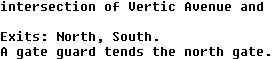
- They recognise and display colour codes, like this:
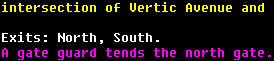
In the features table, interpreting colours is shown as a lower-case "c", displaying colours is shown as an upper-case "C".
Why this particular timing test?
The objective of this test is to time the ability of client programs to display text on the screen which is, after all, one of their prime purposes. By setting up a high-speed connection to a fast server we are timing client performance, not Internet connection speed, or server lag. It is possible that if a client has ...
- A lot of text already in its scrollback buffer
- Many different colour codes arriving
- A lot of triggers to match against incoming text
... then its behaviour may be different (slower, probably). All of these tests were run with no triggers defined, and no incoming colour codes.
Some people have emailed me suggesting that timing tests are irrelevant. I agree that the difference between a client that can display 4,000 lines in 2 seconds, and the same amount in 10 seconds is probably academic. However the slower clients on the list may have trouble keeping up with a busy MUD. When comparing clients of similar speed you would probably want to also compare other features, including ease-of-use.
A situation where you might want the fastest possible client is if you are on a combat-style MUD, particularly as a player-killer, where the speed with which you can react to incoming events could be crucial.
Comments solicited
If you have a client that is not on this list, or believe that a more recent version has better performance, or more features, please contact the author. If you believe a client has more features please list them, not just say "it is all in the help file".
If we have accidentally omitted a feature of a client, we apologise. Some features are hidden away in scripting or help files, and are not immediately obvious.
We have had trouble downloading some clients due to broken links. If you are the author of one not mentioned, feel free to email us with a working URL.